If you search for “WiFi QR code generator,” you’ll find a dozen tools. They all claim to be free, fast, and easy. But they’re not all the same — and for a business that needs reliable, printable, professional-looking codes, the differences matter.
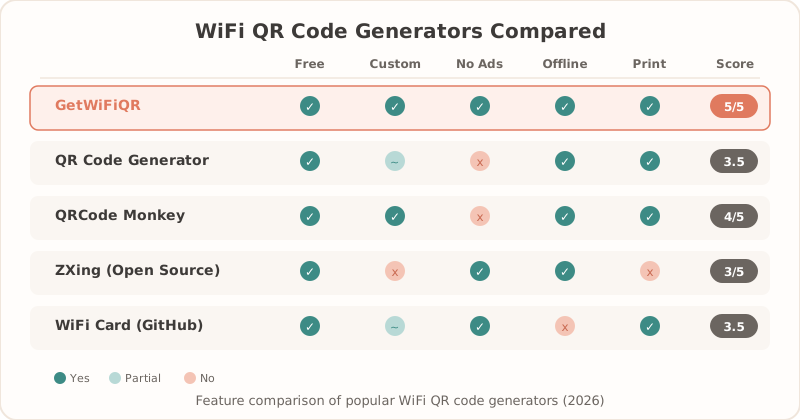
We tested the most popular options across five criteria: ease of use, design quality, file output options, Pro/paid features, and whether they actually work reliably. Here’s what we found.
What to Look for in a WiFi QR Code Generator
Before the comparison, here’s what actually matters for free and professional WiFi QR generator use:
- Reliability: The QR code must work every time, on every device.
- File quality: For printing, you need SVG or high-res PNG — not a blurry JPEG.
- No account required: Friction costs conversions. The best tools don’t gate basic generation.
- WPA/WPA2/WPA3 support: The generator should create valid WiFi payloads for modern router security settings.
- Customization: Logo, color, and style options matter for professional environments.
- Business use: Restaurants, hotels, Airbnb hosts, and offices need printable output, not just a one-time screen code.
- No expiry: Free tools sometimes generate “dynamic” codes that expire or require ongoing subscriptions just to keep working.
The Comparison
1. getwifiqr.com (WiFi QR)
Best for: Businesses that need professional, print-ready output without an account
getwifiqr.com is purpose-built for WiFi QR codes — not a generic QR generator that happens to support WiFi. That focus shows.
Free tier includes:
- Instant WiFi QR code generation (SSID, password, encryption type)
- SVG + PNG download — print-ready at any size
- No account required
- Multilingual support (English, Spanish, French, German)
Pro tier ($9/30 days or $29 lifetime) adds:
- Custom colors and branding
- Logo overlay on the QR code
- Multiple design styles
- Priority support
Strengths:
- Fastest path from “I want a QR code” to “I have a QR code” — under 60 seconds
- SVG output means the code stays sharp on a 2-inch table card or a 24-inch lobby poster
- No upsell pop-ups during free generation
- Lifetime Pro option is genuinely rare — most competitors lock you into subscriptions
Weaknesses:
- No dynamic QR codes (by design — static codes don’t expire or break)
- No analytics/scan tracking (not needed for most WiFi use cases)
Verdict: The cleanest, fastest option for businesses that just want a QR code that works and looks professional. The free tier is genuinely free, and the lifetime Pro option is excellent value.
2. QR Code Generator (qr-code-generator.com)
Best for: Users who want dynamic QR codes with scan analytics
This is a well-known general-purpose QR generator that supports WiFi among dozens of QR types.
Free tier includes:
- Basic WiFi QR code generation
- PNG download (limited resolution)
- Account required for most features
Paid tier (from ~$9/month):
- High-res downloads
- Custom design
- Dynamic QR codes with scan tracking
Strengths:
- Solid reputation, well-maintained platform
- Dynamic QR codes are useful for campaigns where you want to update the destination
- Scan analytics if you need to track engagement
Weaknesses:
- Free tier is quite limited — low-res PNG only
- Account required upfront
- Monthly subscription model — you pay ongoing even for static WiFi codes that never change
- WiFi QR is one of many features, not the focus
Verdict: A solid general QR tool, but overkill for simple WiFi sharing. The ongoing subscription makes less sense when your WiFi password rarely changes.
3. QRCode Monkey (qrcode-monkey.com)
Best for: One-off custom QR codes with design customization
QRCode Monkey is popular for its free customization options — colors, logos, shapes.
Free tier includes:
- High-res PNG (300 DPI)
- Logo upload
- Color and shape customization
- No account required
Paid tier:
- SVG/PDF export
- Batch generation
- No branding in downloaded codes
Strengths:
- More free customization than most competitors
- No account required
- PNG quality is decent for most printing
Weaknesses:
- WiFi QR support exists but isn’t the focus
- No SVG on free tier
- No multilingual support
- Interface is more complex than needed for a simple WiFi code
Verdict: Good free option if you want a custom-styled code and don’t need SVG. More setup work than purpose-built WiFi tools.
4. QR Code Generator by Shopify (tools.qr-code-generator.com)
Best for: Shopify merchants who want a quick utility
This Shopify-branded tool is a simple, free QR generator with no frills.
Free, no account:
- Basic QR generation
- PNG download
- No design customization
- No WiFi-specific input (you’d need to manually format the WiFi string)
Strengths:
- Completely free, no account
- Fast and simple
Weaknesses:
- No native WiFi QR support — you’d have to know the WiFi QR format manually
- No design options
- PNG only, limited resolution
Verdict: Not really designed for WiFi QR codes specifically. Fine for a quick URL QR, but use a purpose-built tool for WiFi.
5. Adobe Express QR Code Generator
Best for: Adobe Creative Cloud subscribers who want QR codes within their workflow
Adobe Express includes a QR code generator as part of its broader design platform.
Free tier includes:
- Basic QR generation
- Integration with Adobe design tools
- Account required
Paid (Adobe Express Premium / CC subscription):
- Full design customization
- High-res exports
Strengths:
- Good if you’re already in the Adobe ecosystem
- Design integration for creating branded print materials
Weaknesses:
- Requires Adobe account
- WiFi QR is not a primary feature
- Overkill for simple WiFi code generation
- Subscription cost assumes you’re using Adobe for more than QR codes
Verdict: Only relevant if you’re already an Adobe subscriber. For WiFi QR specifically, it’s unnecessary complexity.
Side-by-Side Comparison
| Tool | Free use | Print-ready | No signup | WPA/WPA2/WPA3 | Customization | Business fit |
|---|---|---|---|---|---|---|
| getwifiqr.com | ✅ | SVG + PNG | ✅ | ✅ | Pro colors/logo | Strong for restaurants, hotels, Airbnb, offices |
| QR Code Generator | Limited | Paid high-res | ❌ | ✅ | Paid | Good if you need analytics |
| QRCode Monkey | ✅ | PNG free, SVG paid | ✅ | ✅ | Strong | Good for one-off styled codes |
| Shopify QR Tool | ✅ | Basic PNG | ✅ | Manual format | Minimal | Better for URL QR codes |
| Adobe Express | Limited | Design export | ❌ | Manual format | Strong | Useful inside Adobe workflows |
When You Need a Professional WiFi QR Generator
A professional WiFi QR generator matters when the code will be printed, handled by guests, or used across more than one location. Look for:
- Templates: Table tents, lobby signs, room cards, and welcome-guide layouts.
- Bulk printing workflow: Consistent file names and high-resolution exports for multiple rooms or networks.
- Reliable scans: High contrast, correct quiet zone, and SVG output for resizing.
- Business handoff: Links from the generator to guest WiFi setup, hotel placement, Airbnb cards, and restaurant WiFi QR setup.
Which One Should You Use?
If you want the fastest, simplest path to a professional WiFi QR code: Use getwifiqr.com. It’s purpose-built, the free tier gives you SVG output, and there’s no account friction. The lifetime Pro option is the best value in the category.
If you need dynamic QR codes with scan tracking: QR Code Generator (qr-code-generator.com) is the right choice — just factor in the ongoing subscription cost.
If you want free design customization and don’t need SVG: QRCode Monkey is solid for one-off branded codes.
If you’re an Adobe Creative Cloud user: Adobe Express works, but it’s not optimized for WiFi specifically.
The Bottom Line
Most WiFi QR code generators weren’t built for WiFi — they’re generic tools that happen to support it. If you run a restaurant, hotel, Airbnb, or office and want a QR code your guests can actually scan and connect with, use a tool that was designed for exactly that.
Create your free WiFi QR code →
Related Articles
- WiFi Password Generator for WPA2/WPA3 Routers — create a strong password before printing a code
- Guest WiFi Best Practices for Small Businesses — set up a business guest WiFi workflow
- Hotel Guest WiFi Setup: Best Practices for 2026 — place QR codes in hospitality spaces
- How to Create a WiFi QR Code (Free Step-by-Step Guide) — generate your QR code in under a minute
- Print WiFi QR Code: Size, Material & Placement Guide — the right size, material, and placement for your printed QR code
- Are WiFi QR Codes Secure? What You Need to Know — understand the security model behind WiFi QR codes
- WiFi QR Code vs. Sharing Password Manually — how QR codes compare to traditional password sharing