As WiFi QR codes become more popular in hotels, restaurants, and vacation rentals, a common question arises: are they safe to use? In this article, we’ll explain how WiFi QR codes work, address security concerns, and share best practices for keeping your network secure. If you’re setting one up now, you can create a code in seconds with our WiFi QR code generator.
How WiFi QR Codes Work
A WiFi QR code is simply a visual encoding of your network credentials. When you create one, the generator encodes your network name (SSID), password, and security type into a standard QR code format.
When someone scans the code, their phone reads this encoded information and uses it to configure a network connection - exactly the same as if they typed the password manually.
Important: The QR code itself doesn’t create any new security vulnerabilities. It’s essentially a convenient way to share the same information you would share verbally or on a piece of paper. For a detailed comparison of QR codes versus traditional password sharing methods, see our WiFi QR code vs. manual password guide.
Understanding the Security Model
What the QR Code Contains
A WiFi QR code contains only:
- Your network name (SSID)
- Your password
- The encryption type (WPA, WPA2, WPA3, or WEP)
- Whether the network is hidden (optional)
That’s it. No additional data, no tracking, no hidden information. You can see the exact format yourself — our step-by-step creation guide explains the WIFI:T:WPA;S:NetworkName;P:Password;H:false;; structure in detail.
What Happens When You Generate a Code
When using a reputable generator like ours, your credentials are processed entirely in your browser. The password is never sent to any server. You can verify this by generating a code while offline - it still works.
WiFi QR Codes vs. Captive Portals
Many businesses face a choice between WiFi QR codes and captive portals (those login pages that pop up when you connect to a network at airports, hotels, or coffee shops). Both solve the same basic problem — giving guests WiFi access — but they work very differently and have distinct security profiles.
How Captive Portals Work
A captive portal intercepts your web traffic after you connect to an open network. It redirects you to a login or splash page where you might need to enter an email address, accept terms of service, or enter a room number. Only after completing this step does the portal allow your device to access the internet.
Security Trade-offs
Captive portals often run on open (unencrypted) networks. This means the initial connection between the guest’s device and the router is not encrypted, leaving traffic vulnerable to eavesdropping until the device establishes its own encrypted connections (like HTTPS). Even after passing through the portal, the underlying WiFi link itself may remain unencrypted.
WiFi QR codes, on the other hand, connect guests to a password-protected, encrypted network from the very first moment. The connection uses WPA2 or WPA3 encryption, which means all traffic between the device and the router is secured at the network level.
User Experience Differences
Captive portals are notorious for causing frustration. They often fail on certain devices, break when switching between apps, and require re-authentication after a period of inactivity. Many guests have experienced the loop of connecting, getting redirected, filling in a form, and then losing the connection minutes later.
WiFi QR codes provide a one-scan, persistent connection. Once a guest scans the code and connects, they stay connected until they leave the network’s range or manually disconnect. There are no forms to fill, no terms to accept on-screen, and no re-authentication loops.
Which Should You Choose?
For most small to medium businesses — restaurants, vacation rentals, small hotels, offices — WiFi QR codes are the simpler, more secure, and more user-friendly option. Captive portals make sense primarily for large venues that need to collect guest data, enforce usage policies, or manage thousands of simultaneous connections. If you don’t need those capabilities, a QR code paired with a dedicated guest network gives you better security with far less complexity.
Real Security Considerations
Physical Security
The main security consideration with WiFi QR codes is physical access. Anyone who can see your QR code can scan it and connect to your network. This is the same as posting your password on a sign.
Best practice: Place QR codes in areas where you want guests to have access, but not in publicly visible locations outside your premises. For example, a QR code on a table inside your restaurant is fine; one on a poster in the front window facing the street is not ideal.
Guest Network Recommendation
For businesses and vacation rentals, we strongly recommend setting up a separate guest network. For a full walkthrough on getting this right, see our guest WiFi best practices guide. Most modern routers support this feature, which:
- Isolates guests from your main network and devices
- Lets you change the guest password without affecting your primary network
- Often allows bandwidth limiting for guest users
Password Rotation
Consider changing your guest WiFi password periodically, especially if:
- You’ve had many different guests over time
- You suspect unauthorized access
- Former employees or tenants had access
With a QR code generator, updating is easy - just generate a new code and replace the old ones.
The Case for WPA3
If your router supports WPA3, use it. WPA3 is the latest WiFi security standard and it brings meaningful improvements over WPA2:
- Stronger encryption per session: WPA3 uses Simultaneous Authentication of Equals (SAE), which gives each device a unique encryption key. Even if someone captures network traffic, they can’t decrypt another user’s data.
- Protection against offline brute-force attacks: With WPA2, an attacker could capture the initial handshake and then try to crack the password offline using powerful hardware. WPA3 makes this approach impractical by requiring a live interaction with the network for each guess.
- Forward secrecy: If someone eventually discovers your password, they can’t use it to decrypt previously captured traffic. Each session’s encryption is independent.
- Better security for simple passwords: WPA3’s SAE handshake provides stronger protections even when the password itself isn’t particularly complex, though you should still use a strong password regardless.
Most routers sold since 2020 support WPA3 or can be updated to support it through a firmware update. Check your router’s admin panel to see if you can enable WPA3 or a WPA2/WPA3 transition mode that supports both older and newer devices.
Potential Risks and How to Avoid Them
Malicious QR Codes
One concern is the possibility of someone replacing your QR code with a malicious one. A bad actor could potentially:
- Redirect users to a fake WiFi network they control
- Point to a phishing website instead of WiFi credentials
Prevention:
- Print QR codes on materials that are hard to tamper with (laminated cards, stickers that show tampering)
- Check your QR codes regularly, especially in public areas
- If you find tampering, replace immediately and investigate
Oversharing Access
Unlike a verbal password that might be forgotten, a QR code can be photographed and shared indefinitely. Consider this when deciding where to place your codes.
Prevention:
- Use guest networks with limited access
- Rotate passwords periodically for sensitive environments
- Place codes only in areas you control
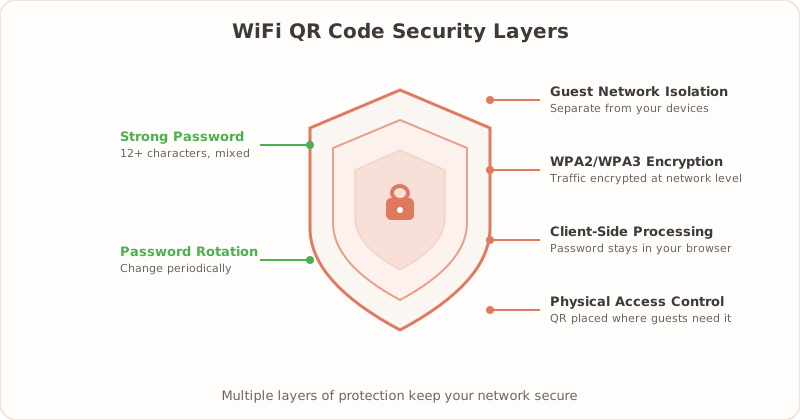
Best Security Practices Summary
- Use a guest network - Keep your main network private
- Use WPA3 or WPA2 - Never use WEP; it’s easily cracked
- Strong passwords - Use at least 12 characters with mixed case, numbers, and symbols
- Physical placement - Put QR codes only where guests should have access
- Monitor your network - Check connected devices occasionally
- Rotate passwords - Change them periodically, especially after high-traffic periods
- Use reputable generators - Ensure your password is processed locally, not sent to servers
Security Checklist
Before you print and display your WiFi QR code, run through this checklist to make sure your setup is solid:
- You are sharing a guest network, not your primary network
- Your guest network uses WPA2 or WPA3 encryption (not WEP, not open)
- Your WiFi password is at least 12 characters and includes a mix of letters, numbers, and symbols
- You generated the QR code using a tool that processes credentials locally in your browser (not uploaded to a server)
- You have tested the QR code with at least two different phones (one iPhone, one Android)
- The QR code is displayed inside your premises, not visible from outside
- The printed QR code is laminated or tamper-evident so it can’t easily be swapped out
- You have a schedule for rotating passwords (monthly, quarterly, or after high-traffic periods)
- Your router’s firmware is up to date
- You periodically review connected devices on your guest network for anything unexpected
If you can check every item on this list, your WiFi QR code setup is well above average in terms of security. Most issues come from skipping the basics — using the main network instead of a guest network, or never changing the password — rather than from anything specific to QR codes.
Our Security Commitment
At getWiFiQR, we built our generator with security as a priority:
- 100% client-side processing - Your password never leaves your browser
- No data collection - We don’t track or store your credentials
- Works offline - Prove it’s local by disconnecting and trying it
- Open standard - We use the standard WiFi QR format, no proprietary tricks
The Bottom Line
WiFi QR codes are as secure as the passwords they contain. They don’t introduce new technical vulnerabilities - they’re simply a more convenient way to share credentials that you would share anyway.
By following basic best practices like using guest networks, strong passwords, and being mindful of physical placement, you can enjoy the convenience of WiFi QR codes while keeping your network secure.
Ready to create a secure WiFi QR code for your hotel, restaurant, or vacation rental? Generate your code now - it’s free and takes just seconds.
For a practical walkthrough, see our step-by-step WiFi QR setup guide.
Related Articles
- WiFi QR Code vs. Sharing Password Manually — comparing QR codes to traditional password sharing methods
- How to Create a WiFi QR Code (Free Step-by-Step Guide) — create your secure WiFi QR code in under a minute
- Guest WiFi Best Practices for Small Businesses — set up a secure guest network the right way