There are many ways to share WiFi access with guests: write it on a chalkboard, print it on a card, tell them verbally, or use a QR code. Each method has its place, but which one is best for your situation? Let’s compare. If you already know you want the QR route, you can jump straight to the free generator.
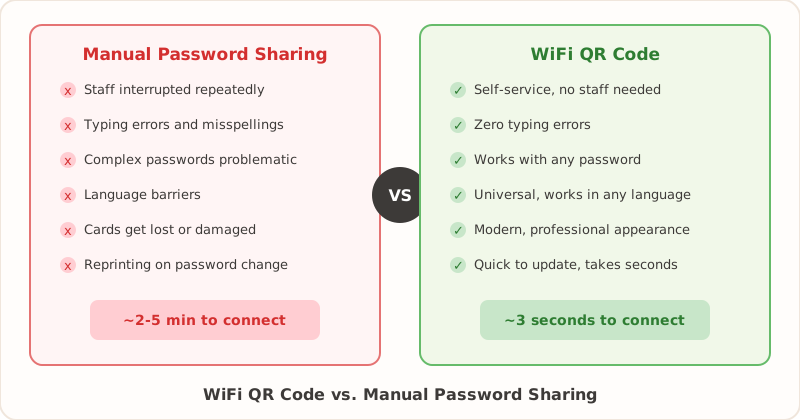
The Traditional Methods
Verbal Sharing
How it works: Someone asks for the WiFi, you tell them the password.
Pros:
- Zero setup required
- Personal interaction with guests
- Works even without printed materials
Cons:
- Interrupts staff repeatedly
- Password often misheard or misspelled
- Difficult with complex passwords
- Not scalable for busy environments
- Language barriers can complicate things
Written Signs or Cards
How it works: Print or write the password on paper, cards, or signs.
Pros:
- Self-service - guests help themselves
- Can be branded and professional
- Works without technology
Cons:
- Guests must type password manually
- Typos and case-sensitivity cause frustration
- Cards get lost or damaged
- Updating means reprinting everything
The QR Code Method
WiFi QR Codes
How it works: Guests scan a QR code with their phone camera and tap to connect.
Pros:
- One-tap connection - no typing
- Eliminates spelling/typing errors
- Works with complex passwords
- Modern, professional appearance
- Universal - works on any recent smartphone
- Quick to update when passwords change
- Self-service - no staff needed
Cons:
- Requires a smartphone with camera
- Very old phones may not support it
- Initial setup (though it only takes a minute — see our step-by-step creation guide)
Comparison by Use Case
Restaurants and Cafes
| Factor | Manual | QR Code |
|---|---|---|
| Staff interruptions | High | None |
| Customer experience | Frustrating | Seamless |
| Complex passwords | Problematic | No issue |
| Busy periods | Overwhelming | Self-managed |
Winner: QR Code. Restaurants and cafes benefit most from QR codes. Staff can focus on service instead of repeating passwords, and customers connect instantly.
Hotels and Resorts
| Factor | Manual | QR Code |
|---|---|---|
| Check-in efficiency | Slower | Faster |
| Guest satisfaction | Average | Higher |
| Multi-location display | Inconsistent | Uniform |
| Password updates | Labor-intensive | Quick |
Winner: QR Code. Hotels can place QR codes in rooms, lobbies, and common areas for consistent, instant access throughout the property.
Airbnb and Vacation Rentals
| Factor | Manual | QR Code |
|---|---|---|
| Guest messages | Frequent | Rare |
| First impression | Standard | Modern |
| Welcome guide | Text-heavy | Scannable |
| Reviews impact | Neutral | Positive |
Winner: QR Code. Airbnb hosts can reduce “What’s the WiFi?” messages and impress guests with modern, thoughtful touches.
Offices and Coworking
| Factor | Manual | QR Code |
|---|---|---|
| IT support load | High | Minimal |
| Meeting readiness | Delayed | Instant |
| Visitor onboarding | Manual | Self-service |
| Professional image | Standard | Modern |
Winner: QR Code. Office environments and events benefit from reduced IT burden and faster visitor connectivity.
The Cost of Manual Password Sharing
It’s easy to overlook the real costs of sharing WiFi passwords the old-fashioned way, because they don’t show up on an invoice. But they add up quickly.
Staff Time
Think about how many times per day someone in your business answers the question “What’s the WiFi password?” In a busy restaurant, that might happen 30 to 50 times a day. Each interaction takes 30 seconds to a minute — finding the password, spelling it out, waiting while the guest types it in, troubleshooting when it doesn’t work the first time. That’s easily 20 to 40 minutes of staff time lost every single day. Over the course of a month, you’re looking at 10 or more hours spent on something that a QR code eliminates entirely.
Error Correction
When guests type a password wrong, they come back to ask again. Or they assume the WiFi is broken and leave a negative review. Each failed connection attempt costs additional staff time and risks guest satisfaction. Passwords with mixed case, numbers, and special characters (the kind you should be using for security reasons) are especially prone to typos.
Reprinting Costs
Every time you change your WiFi password, you need to update every sign, card, tent card, welcome guide, and menu insert that displays it. For a hotel with QR codes in 50 rooms, updating means printing 50 new codes — but with a QR code generator, the digital part takes 30 seconds. Compare that to redesigning and reprinting branded cards or signs, which might cost real money and take days to arrive from a print shop.
The Bottom Line on Costs
A single WiFi QR code, printed on a laminated card, costs almost nothing to produce and saves hours of staff time every month. For most businesses, the return on investment is immediate and obvious.
When Manual Might Still Win
There are a few situations where manual password sharing still makes sense:
- Very low guest volume: If you rarely have guests, the setup time (minimal as it is) might not be worth it
- Elderly demographics: If most of your guests don’t use smartphones or are unfamiliar with QR codes
- Controlled access: When you want to personally verify each person before giving access
Even in these cases, you could offer both options - a QR code for those who prefer it, with the written password as backup.
The Hybrid Approach
The best solution for many businesses is to offer both:
- Display a QR code prominently for quick scanning
- Include the written password below for those who prefer it
- Have staff ready to help if someone has trouble
This ensures everyone can connect, regardless of their technical comfort level.
What a Hybrid Display Looks Like in Practice
A well-designed hybrid display puts the QR code front and center with a short instruction like “Scan to connect to WiFi” and then includes the network name and password in smaller text below. You can see creative examples in our WiFi password display ideas guide.
For a restaurant, this might be a small acrylic table stand with the QR code on one side and the written credentials on the other. For an Airbnb, it could be a framed card on the kitchen counter or inside the welcome binder. Hotels often place a branded card on the desk in each room with both options.
The key is making the QR code the primary, most visible option while keeping the written password available as a fallback. Over time, you’ll find that the vast majority of guests go straight for the QR code, and the written password is used less and less.
Accessibility Considerations
Offering both methods also addresses accessibility. Guests with vision impairments may prefer having a staff member read the password to them. Guests who don’t own a smartphone (increasingly rare, but it happens) need the written option. And some older guests may simply feel more comfortable typing a password than scanning a code, even if they’re capable of either.
Transition Tips for Businesses
If you’ve been sharing WiFi passwords manually and want to switch to QR codes, here’s how to make the transition smooth.
Start with a Pilot
Pick one location or area to test first. If you’re a restaurant, put QR codes on a few tables and see how guests respond. If you run a hotel, try it in the lobby and a handful of rooms before rolling it out property-wide. This lets you work out placement, sizing, and any issues before committing fully. Our printing guide covers sizing and material recommendations.
Train Your Staff
Let your team know the QR codes are coming and show them how to use one. Staff should be able to explain the process to a guest in one sentence: “Just point your phone’s camera at the code and tap the notification to connect.” If staff are confident with it, guests will be too.
Keep the Written Password Available During the Transition
Don’t remove written passwords on day one. Run both side by side for a few weeks. This gives guests who are used to the old method time to adjust, and gives you a fallback while you confirm everything works perfectly.
Choose the Right Placement
The QR code should be in the most natural place a guest would look for WiFi information. In a restaurant, that’s on the table. In a hotel room, that’s on the desk or nightstand. In an Airbnb, that’s near the entrance or in the most-used living space. Avoid putting it somewhere that requires guests to ask “Where’s the WiFi info?” — that defeats the purpose.
Set a Password Rotation Schedule
Switching to QR codes is a good time to establish a regular password rotation habit. Decide on a cadence — monthly, quarterly, or after each guest checkout for vacation rentals — and stick to it. Since generating a new QR code takes less than a minute, there’s no excuse to let the same password linger for years. A regular rotation schedule is one of the most effective things you can do for network security.
Measure the Impact
After the switch, pay attention to a few things: Are guests asking for the WiFi password less often? Are you seeing fewer complaints about WiFi connectivity? Has the number of “What’s the WiFi?” messages dropped (especially relevant for Airbnb hosts)? These are all signs the transition is working.
Making the Switch
Transitioning to WiFi QR codes is simple:
- Visit our free WiFi QR code generator
- Enter your network details (takes 30 seconds)
- Download and print your QR code
- Place it where guests can easily scan
The entire process takes less than a minute, and you can always regenerate a new code when your password changes. For ideas on where to display your code and what materials to use, check out our WiFi password display ideas and printing guide.
The Verdict
For most businesses and hosts, WiFi QR codes are the clear winner. They eliminate friction, reduce staff burden, and create a more modern guest experience. The technology is now universal enough that virtually all guests can use it.
Ready to upgrade your WiFi sharing? Create your free QR code now.
If security is your main concern, read: Are WiFi QR codes secure?.
Related Articles
- Are WiFi QR Codes Secure? What You Need to Know — understand the security model behind WiFi QR codes
- How to Create a WiFi QR Code (Free Step-by-Step Guide) — create your QR code in under a minute
- WiFi Password Display Ideas for Every Business — creative ways to display your WiFi credentials to guests